Hey, gonna hand out some tips and things you lot most likely didn’t know (unless you stumbled upon it by accident or other means)
They will be in “spoilers”, ordered by the toolbar you see above the text editor field.
Not sure what the toolbar is? Refer to the image below;
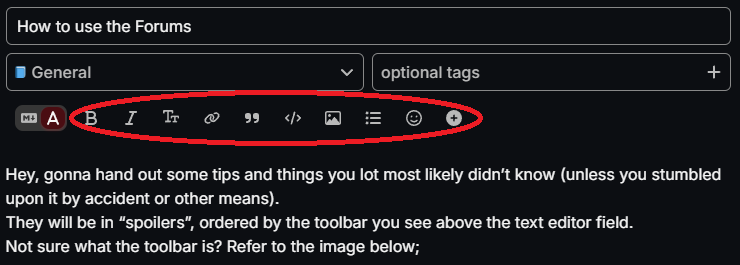
If you’re wondering what’s the first one, it’s a switch from rich text editor to Markdown editor. Markdown editor is more advanced version of text editor, so this is no rookie stuff. You’ll be hearing the editor a few times here.
Bold & Italic font
BOLD and italic font (B and I symbol)
The two letters in the image below customise your font, showing in either bold (B), italic (I) or both.

This can be found right above the text editor area. You’ll learn how to use it, it’s rather simple.
Header font
HEADINGS / HEADER (Tt symbol)

The Tt is a header font. Think of it setting a “chapter” in your post.
Here’s a header font one
Here’s a header font two
and so on, until fourth one and paragraph one, which is the default one.
I found the header font tricky to work with (switching to Markdown editor seemed to fix it?) Maybe I’m overthinking on how it works.
Link function (this is link to HLM Forums)
Link

With link function, you can link a letter/word/sentence, making it clickable & directing an user to website.
This is a link to HLM Forums. (linking is bugged in spoilers, had to do it Markdown way)
To create a link, you need to highlight a word, click the Link function & insert a link you’d like to insert into a word.
To see if it worked, you can try directing yourself to the website by clicking the word you linked (or open it in external tab)
Blockquote function
Blockquote

Right now, you are reading a blockquote.
This can be used to indicate a quote from someone from a post.
To enable Blockquote, you click on the " symbol. Do note that it blockquotes the whole post. To avoid this, you’ll have to do it manually via Markdown editor.
Preformatted text
Preformatted text

This is what preformatted text looks like.
It looks odd, yes. I don’t use it lot myself, but if my memory recalls correctly, this is not entirely useless.
I cannot recall what usage it had, but that’s preformatted text. One day I’ll remember what usage it had.
Upload Image function
Upload

Very self-explanatory. Upload an image & it’ll be inserted inside the selected text field.

You can either shrink the image or largen the image (defaulted at max large). The grid option I’m not entirely sure, though I can imagine you can use it to add text beside the image.
List function
Lists
- With lists function, you can do either bulleted lists (the dot at start), or;
- Numbered lists (1., 2., 3., etc), or;
- Check lists (approved!)
- Check lists (not approved!)
This is a nice way to tidy & format up your posts, bulleting some points, or numbering points and so on.
Emoji symbol I believe is pretty much simple. 

You can also do :\slight_smile\: (remove \) to automatically convert it into an emoji, you’ll get a selection of emojis (atleast on PC)
So that’s the short explanation of what each function in the toolbar does. I may do another post regarding the plus symbol, since that one will be helpful in the future.
Happy posting!